PDF Dark Mode on Android: Read PDFs Without Eye Strain
Android has a system-wide dark theme, but it does not change the content of PDF files. Open a PDF in Google Drive, Chrome, or any file manager and the pages are still white. If you read documents on your phone regularly, here is how to get a proper dark background.
Convert the PDF on your phone
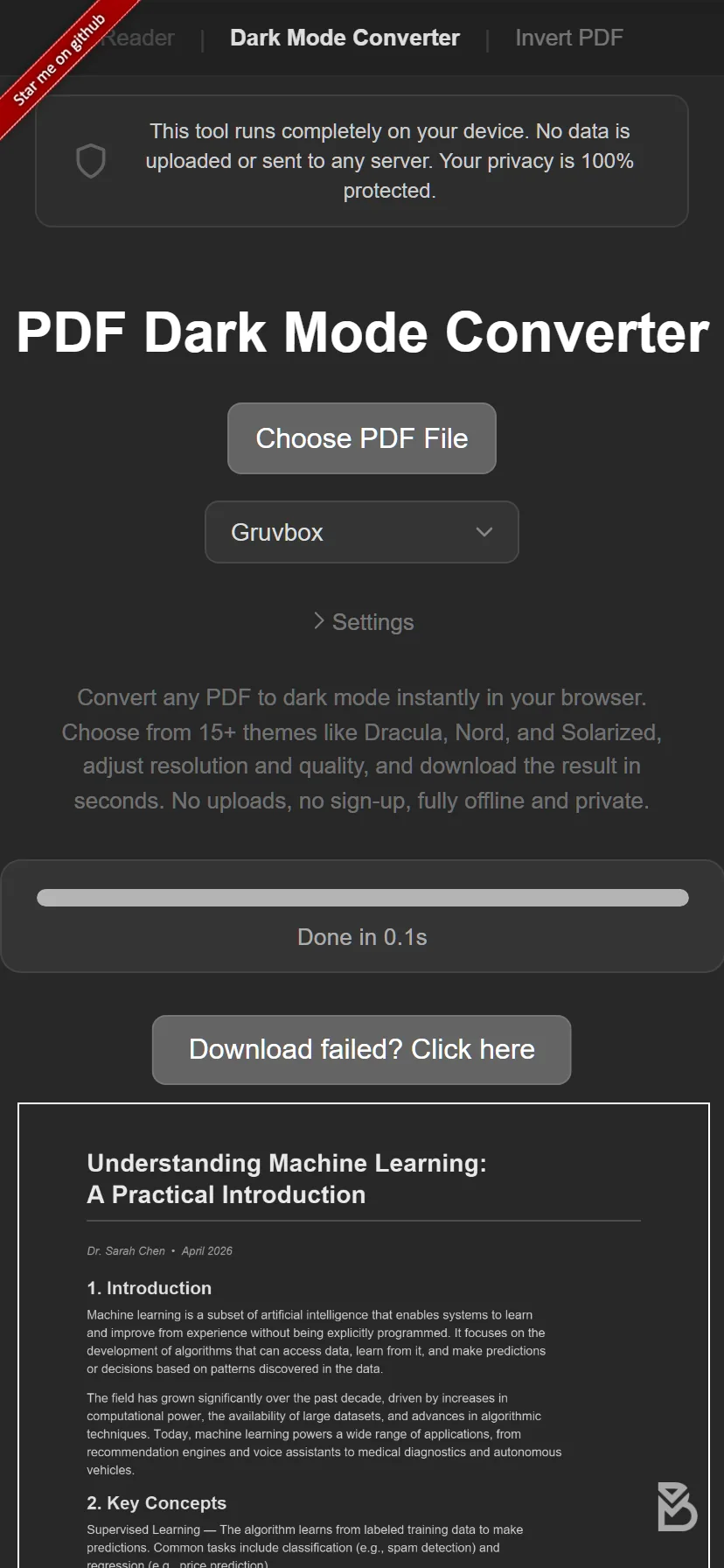
You do not need to install an app. Open the PDF Dark Mode Converter in Chrome (or any browser) on your Android device:
- Tap the upload button or drag your PDF onto the page.
- Choose from 16+ themes. Popular picks include Dracula, Nord, Solarized, and Tokyo Night.
- The dark-mode PDF downloads automatically to your device.
The conversion happens on your phone, not on a remote server. Your file stays completely private. The tool uses your device's GPU for the color processing, so it finishes quickly even on mid-range phones.
What about Google Drive's dark mode?
Google Drive's app supports dark mode, but this only changes the app interface (the menus and file list). When you open a PDF, the document pages themselves stay in their original colors. There is no way to change this from within Google Drive.
What about the Android night mode / reading mode?
Some Android phones have a reading mode or comfort shield that adds a warm tint to the screen. This reduces blue light, which can help with eye strain at night, but it does not actually darken the PDF background. You are still looking at a tinted white page rather than a true dark background.
PDF reader apps with dark mode
A few Android PDF readers (like Xodo or Moon+ Reader) offer a dark reading mode. These work as a display overlay, which means:
- The effect only shows inside that one app.
- If you share the file, the recipient sees the original white PDF.
- You need to install and set up another app.
Converting the file gives you a permanent dark-mode PDF that works in any app and any sharing scenario.
If you prefer a larger screen, see our iPad dark mode guide. For iPhone users, we have a separate iPhone guide with tips tailored to smaller screens.
Try it now: Open the PDF Dark Mode Converter on your Android phone. Pick a theme, convert your PDF, and download it in seconds. Free, private, no app install needed.
Frequently Asked Questions
No, Android's dark theme only affects app interfaces. PDF content keeps its original colors in every viewer and file manager.
No. The PDF Dark Mode Converter works directly in your phone's browser with no app installation required.
Yes, the converter runs in Chrome or any browser on Android. It uses your phone's GPU for fast processing and your file never leaves your device.